Multi-service public portal
Personal portal for public services
An authenticated portal that brings personal information, notifications and service access into one place, including a unified view of pension contributions.
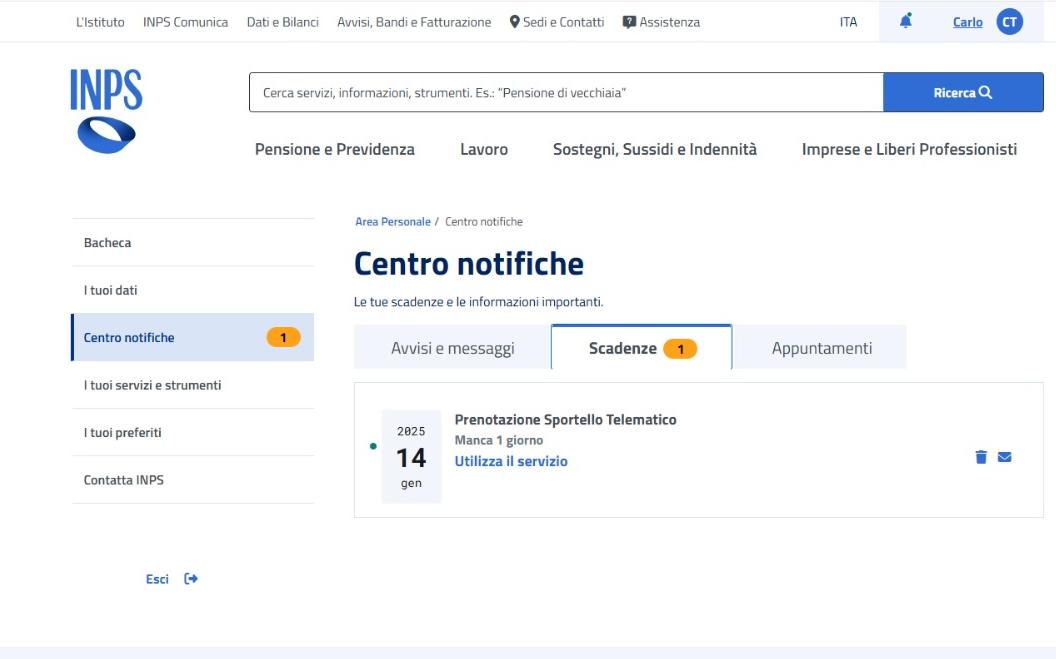
This authenticated portal brings personal information, notifications and public services into a shared dashboard. The rebuild had to preserve existing service integrations while improving navigation and the consistency of the interface.
01 / The portal
One personal area, several service journeys
The reserved area provides a common shell and dashboard through which users reach the services available to them. The experience has to remain recognizable as people move between personal information, notifications, tools and service-specific views.
This was a ground-up rebuild with existing integrations to support. Native Angular views, shared libraries, Web Components and embedded experiences all formed part of the surrounding service ecosystem.
02 / Service integration
Give the portal a clear responsibility
The portal must present a coherent authenticated area while existing services retain different data models, permissions and release lifecycles. Rebuilding the shell cannot require every integrated service to be rewritten at the same time.
I worked on the Angular shell as a composition layer for layout, routes, dashboard navigation and permission-aware presentation. I kept service-specific behavior in its own integration and derived navigation from entitlement data instead of maintaining separate menu lists.
The shell has to accommodate existing routing and embedded services. It uses permissions to present relevant navigation, while each service backend remains responsible for authorization.
03 / Typed sections
Keep contribution domains strongly typed
Inside the contribution-statement service, different pension domains need distinct data types and filters. One large component with a branch for every domain would couple unrelated rendering and validation rules.
For the contribution-statement service, I used a generic section-component pattern to share filtering and rendering mechanics. I kept domain-specific TypeScript types in the concrete sections and connected them through typed section keys, avoiding one large component full of domain checks.
Dynamic component registries complicate generic typing. The approach keeps precise types inside each section and confines the weaker typing needed for dynamic composition to the registry.
04 / Responsive navigation
Use the same route for desktop tabs and mobile selection
Desktop tabs and a mobile selector can drift apart if each maintains its own selected section. Dense filtered data also makes implicit rendering and in-place state mutation harder to reason about.
I used Angular child routes as the selection model for both desktop tabs and the mobile selector. I also used OnPush to make rendering boundaries explicit, with state updates propagated through new references and reactive values.
The route table, section registry and available data have to agree. OnPush also requires state changes to reach the view through new references or reactive updates. Focus, browser history and scroll behavior need to remain consistent when users switch sections.
05 / Contribution records
Contribution records are a service within the portal
The contribution-statement service brings several pension contribution domains into one navigable experience. Users can move between an overview and domain-specific sections, with the available sections driven by service data.
It belongs to the personal portal rather than forming a separate platform. Its typed section architecture and responsive route-backed navigation address the service’s specific data needs while the surrounding portal supplies shared access and layout.
Evidence & further reading