Public-service video consultations
Digital public-service appointments
A video-consultation platform where citizens meet public-service operators, discuss their case and exchange documents without visiting an office.
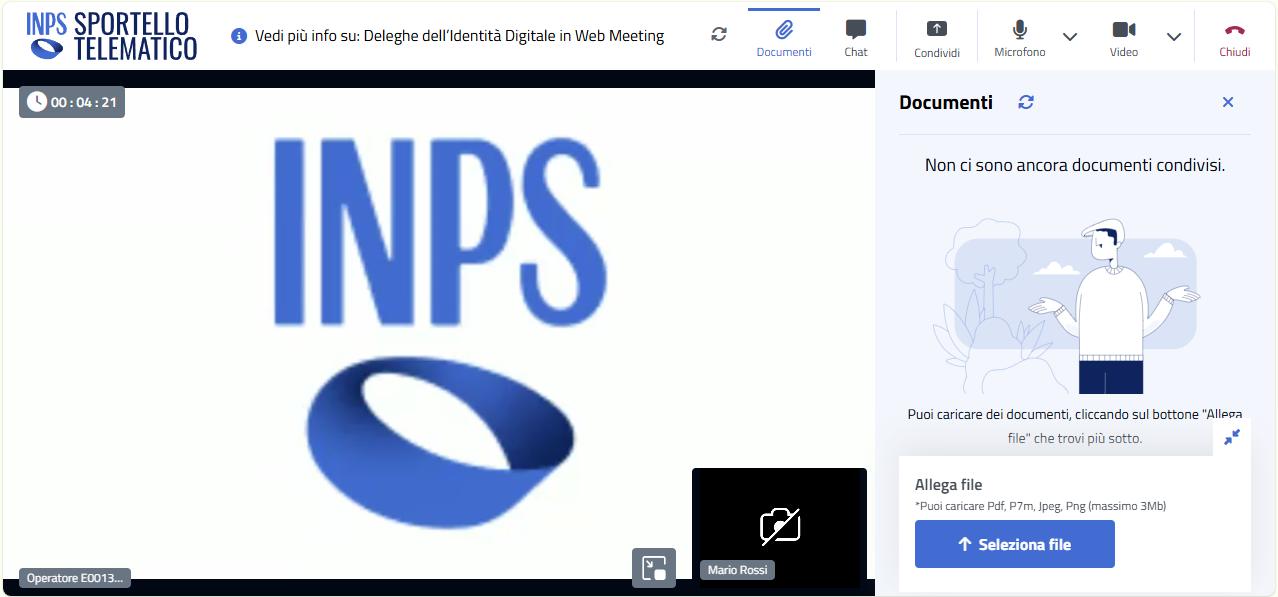
Citizens use the platform to meet a public-service operator by video, share documents and complete an appointment remotely. The Angular frontend serves both Internet and Intranet environments, with shared screens and separate backend integrations.
01 / The service
An online service desk for citizens
The platform connects a citizen with a public-service operator for a scheduled consultation. During the appointment, participants can speak over audio and video, share their screen and exchange the documents needed to handle the request.
Device selection, microphone and camera controls, picture-in-picture and background replacement support the call. Connection and device status help users see what is active and recover when something stops working.
02 / Backend adapters
One frontend for two backends
I needed the same consultation screens to work against separate Internet and Intranet backends. Selecting a backend inside each component would have spread infrastructure differences through the UI and error handling.
I introduced shared abstract services and separate Internet and Intranet implementations, then used Angular dependency injection to supply the right implementation. This let me build the consultation screens against one application-facing contract without putting backend selection into each component.
Both adapters have to preserve the same application behavior even when their APIs differ. This keeps backend-specific code out of the screens, but makes provider configuration and checking both integrations part of every contract change.
03 / Call state
Separate call connectivity from appointment state
Audio and video can remain connected while an application notification is delayed or a business operation fails. Treating media connectivity as the state of the entire appointment gives users misleading feedback.
I integrated Azure Communication Services for audio and video and SignalR for application events. I kept media connectivity separate from appointment state so a connected call would not be mistaken for a completed document exchange or operator action.
Recovery needs to account for both channels. Rejoining a call does not confirm that a document upload or operator action completed, so media status cannot stand in for the state of the appointment.
04 / Device changes
Handle device changes during the call
A microphone can disappear, a user can revoke screen-sharing permission, or a camera can change during a consultation. Controls that only reflect the initial setup become inaccurate while the appointment is still active.
I worked on device switching, screen sharing, picture-in-picture, background replacement and reconnect handling. I focused on keeping the controls aligned with media events during the call; we used Application Insights to help investigate failures that were difficult to reproduce.
The difficult cases happen mid-call: a disconnected microphone, revoked sharing permission or delayed event. The UI needs to explain the current state and available recovery action while the session is still in progress.
Evidence & further reading